
The Spreadsheet Permission feature enables Jira users and administrators to control who can view and edit individual spreadsheets within the Excel-like Bulk Issue Editor for Jira Cloud.
Accessing Spreadsheet Permissions
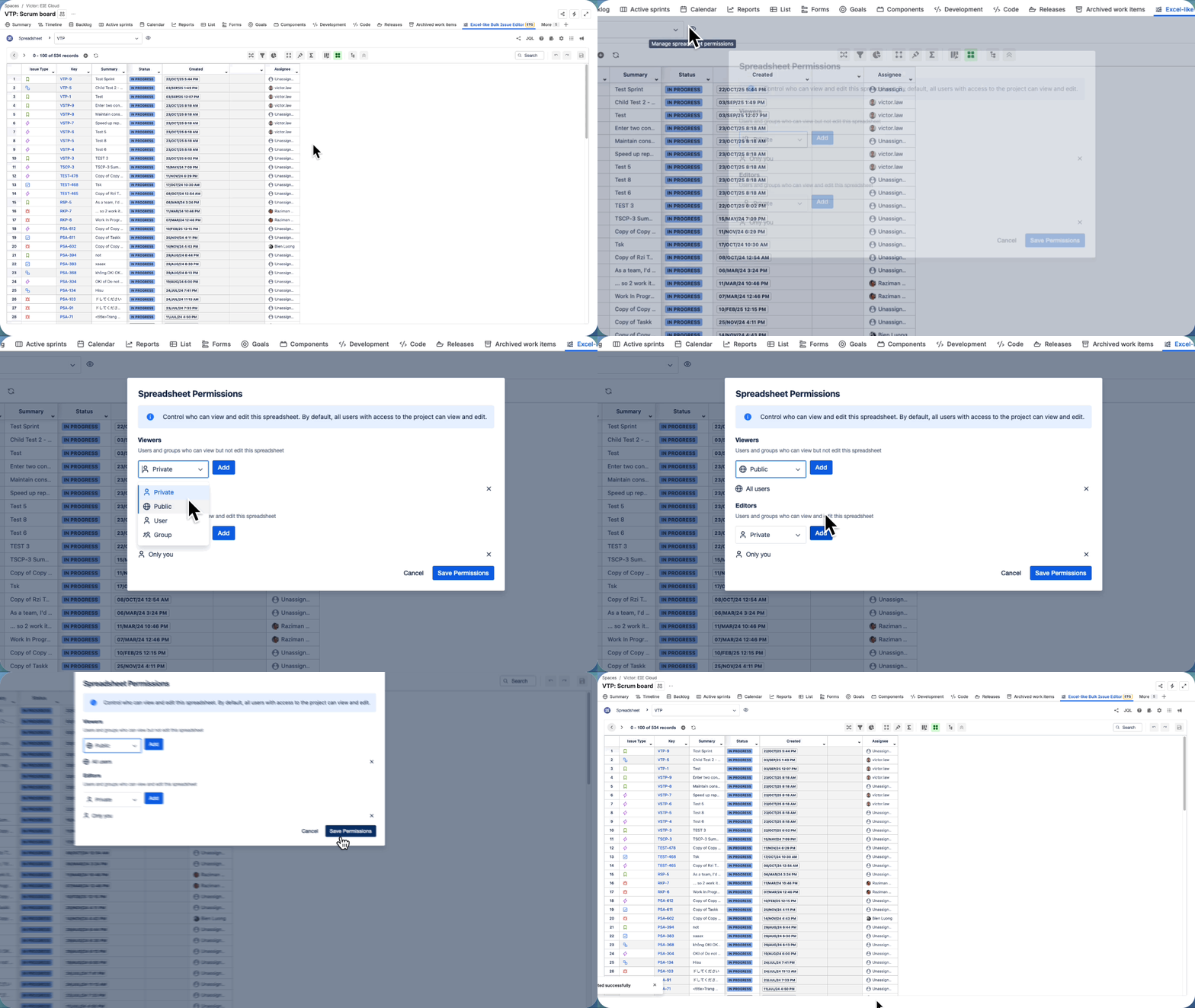
To manage who can view or edit a spreadsheet:
-
Access the corresponding spreadsheet
-
Click on the eye icon or hover over it to see the tooltip:
Manage spreadsheet permissions
Configuring Permissions
In the Spreadsheet Permissions dialog, you’ll see two sections:
Viewers
-
Users or groups who can view the spreadsheet but cannot edit it.
-
They will see the READ-ONLY label at the top of the spreadsheet.
-
Use this setting when you want team members to review data safely without making changes.
Editors
-
Users or groups who can view and edit the spreadsheet.
-
They can make changes such as updating fields, editing cells, or applying filters.