
Overview
From 3.0.0, we’re moving from Atlassian Connect to Forge. This page outlines what changes, what stays the same, and what you may need to do. Forge runs on Atlassian infrastructure for better security and reliability, and your existing data is preserved.
If you rely on Connect-only features (custom REST endpoints, dashboard gadget), review the sections below.
Why we are moving to Forge
-
Security-by-design: Forge runs code in Atlassian’s infrastructure with fine-grained permissions and egress controls.
-
Performance and reliability: Reduced network hops and tighter platform integration.
-
Future readiness: New Atlassian capabilities prioritize Forge.
-
Deprecation and platform alignment: Atlassian is deprecating legacy Connect patterns and tightening performance and security requirements. Moving to Forge keeps the app aligned with supported APIs and avoids breakage as older Connect features are phased out.
What’s changing in version 3.0.0
Forge apps run fully on Atlassian infrastructure. Functionality and integration patterns depend on Atlassian capabilities; some Connect-era patterns, like custom REST services and unrestricted network calls, will change or be removed.
Below are feature-level impacts as we move to Forge. Use the linked references for technical details and current limitations.
Dashboard Gadget (not supported)
We disabled this feature on Forge due to limitations. If your business requires the dashboard gadget, please let us know via support ticket
Reference:Dashboard gadget
Fullscreen Editor (constrained layout)

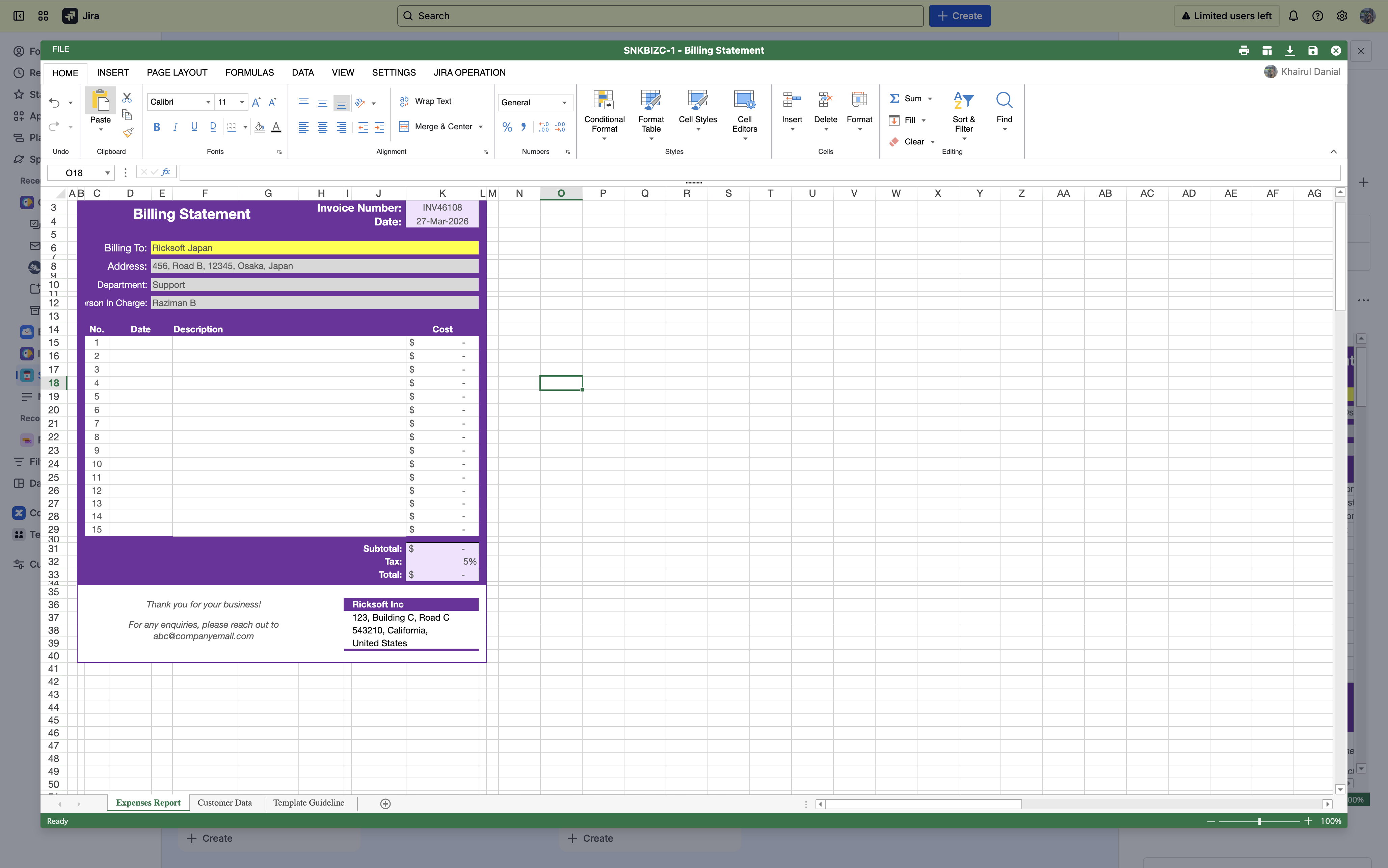
Due to Atlassian limitations, the fullscreen editor does not occupy the entire browser viewport in Forge. The editor remains fully functional, but the visible area is limited by the Forge UI container.
Reference: Fullscreen Editor
REST Endpoints (under review)
Our current REST endpoints rely on a separate Connect app server. As we migrate to Forge, which runs entirely on Atlassian infrastructure, these Connect-based endpoints may be removed. If your automations or integrations call these endpoints, plan a migration to Forge-compatible patterns (Forge resolvers, handlers, or Atlassian REST APIs) with updated authentication and rate limits. Update dependencies early to avoid breakage or inconsistent data writes once Connect is deprecated.
Reference: Using Excel-like Tables for Jira With Scripting Apps
Excel Table Visibility on First Load
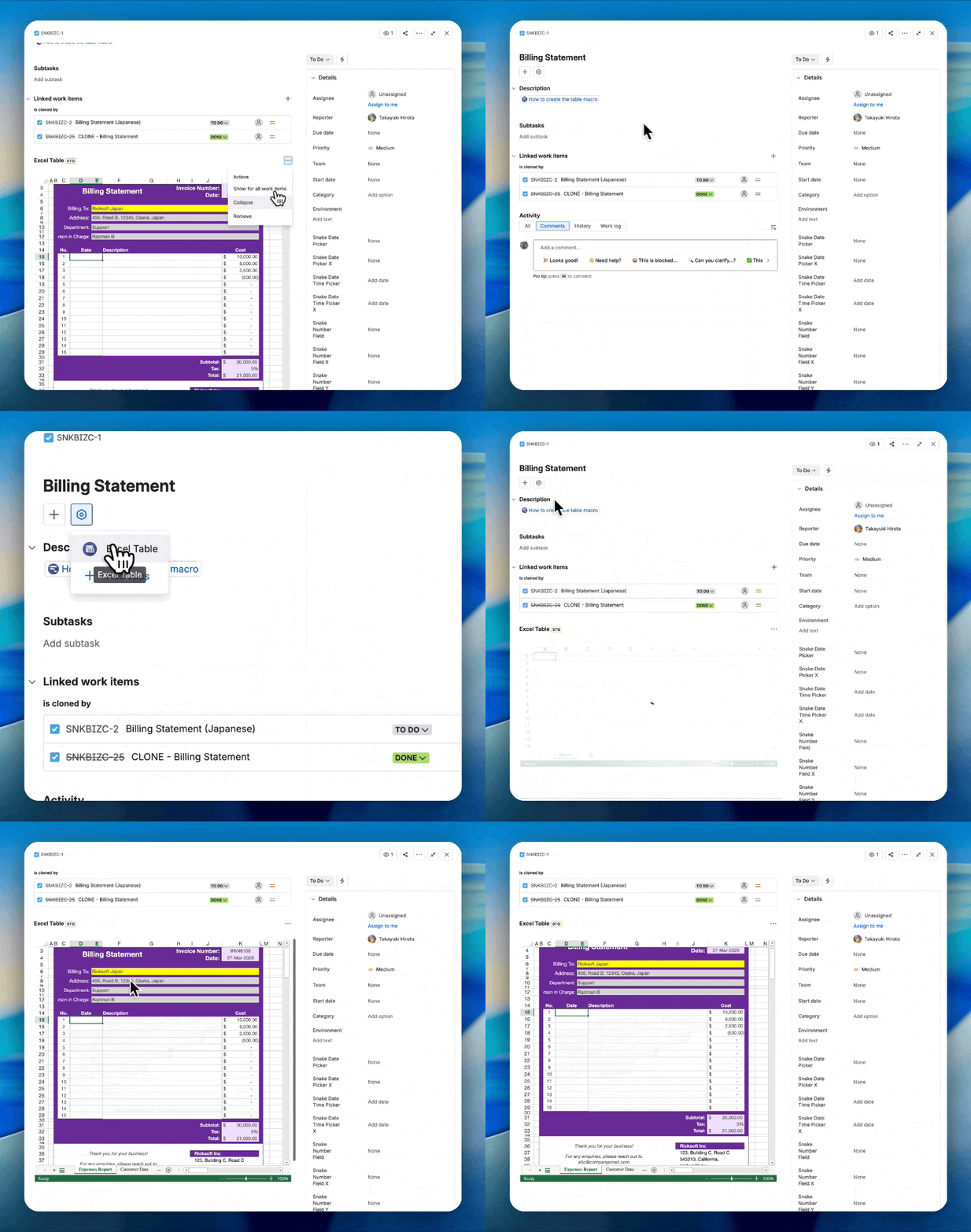
After upgrading to Excel Like Table 3.0.0, tables may appear missing but are simply hidden due to property migration. You can redisplay them by clicking the Excel Table menu in your Jira issues. Your data remains intact and can be re-enabled when viewing the issue.
Reference: Create your first table
Jira Field Mapping: Load/Save Performance Improvements
We improved loading and saving mappings to reduce wait times and enhance resilience under high concurrency.
Reference: Jira Field Mapping
What stays the same
Your data remains intact.
The migration updates the application framework and runtime without modifying or removing your data. Data models and records persist.
User experience overview
-
Navigation: Entry points remain familiar; some views adopt Forge UI patterns and spacing.
-
Permissions: Access remains the same
-
Performance: Expect improved cold start behavior after first interaction and better performance consistency.
Action required (if applicable)
-
Review your reliance on the legacy dashboard gadget. If critical, contact us and share your use case.
-
Identify all uses of Connect REST endpoints (scripts, webhooks, external tools). Design and test your Forge-compatible approach and complete migration.
-
Educate users that tables may be hidden on first load and how to reveal them: https://ricksoft-support.atlassian.net/wiki/spaces/ETFJ/pages/5841420298/Migrating+from+Connect+to+Forge+-+Version+3.0.0+Update#Excel-Table-Visibility-on-First-Load
Support and contact
Questions, edge cases, or critical workflows impacted by these changes? Please reach out through your usual support channel or add a note to clarify your use case. Sharing examples (screenshots, URLs, steps) helps us respond quickly.