
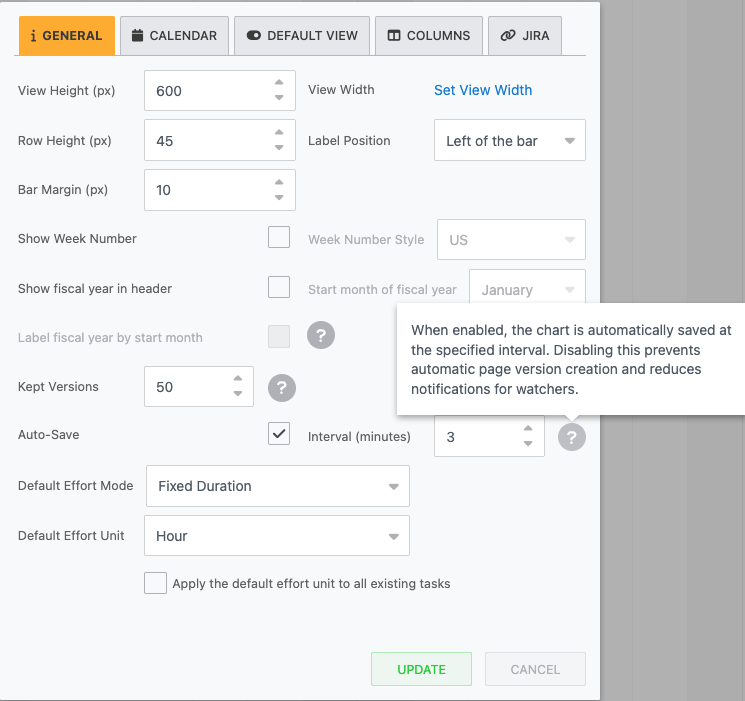
The Auto-Save setting controls whether the Gantt chart saves automatically at set intervals while users edit it.
When enabled, the chart saves periodically in the background, so users don't need to save the Gantt Chart after every change manually.
You can configure Auto-Save from the chart settings:
-
Open the Gantt chart.
-
Click the Cog icon

-
Go to the GENERAL tab.
-
Find the Auto-Save and Interval (minutes) fields.
How Auto-Save works
-
While a user is editing the chart, a timer runs according to the configured Interval (minutes).
-
At each interval:
-
The latest chart state is saved.
-
-
This continues as long as:
-
The user stays on the chart page and
-
Auto-Save remains enabled.
-
Auto-Save complements manual saving, and it does not remove the ability to save changes explicitly.
Recommended usage
-
Recommended:
-
Keep Auto-Save enabled with the default 3-minute interval for most users.
-
This minimizes the risk of losing work due to browser crashes, navigation mistakes, or connection issues.
-
-
Consider disabling:
-
On pages with many watchers, where frequent auto-saves can generate excessive notifications.
-
In review/approval workflows where you only want a small number of deliberate page versions.
-
When Jira integration is enabled and associated with the Gantt chart, especially when integration changes should only be saved and published once they are fully reviewed.
-