
Space Sync for Confluence allows space administrators to delete multiple sync configurations at once, making it easier to remove connections that are no longer needed.
Delete multiple sync configurations
-
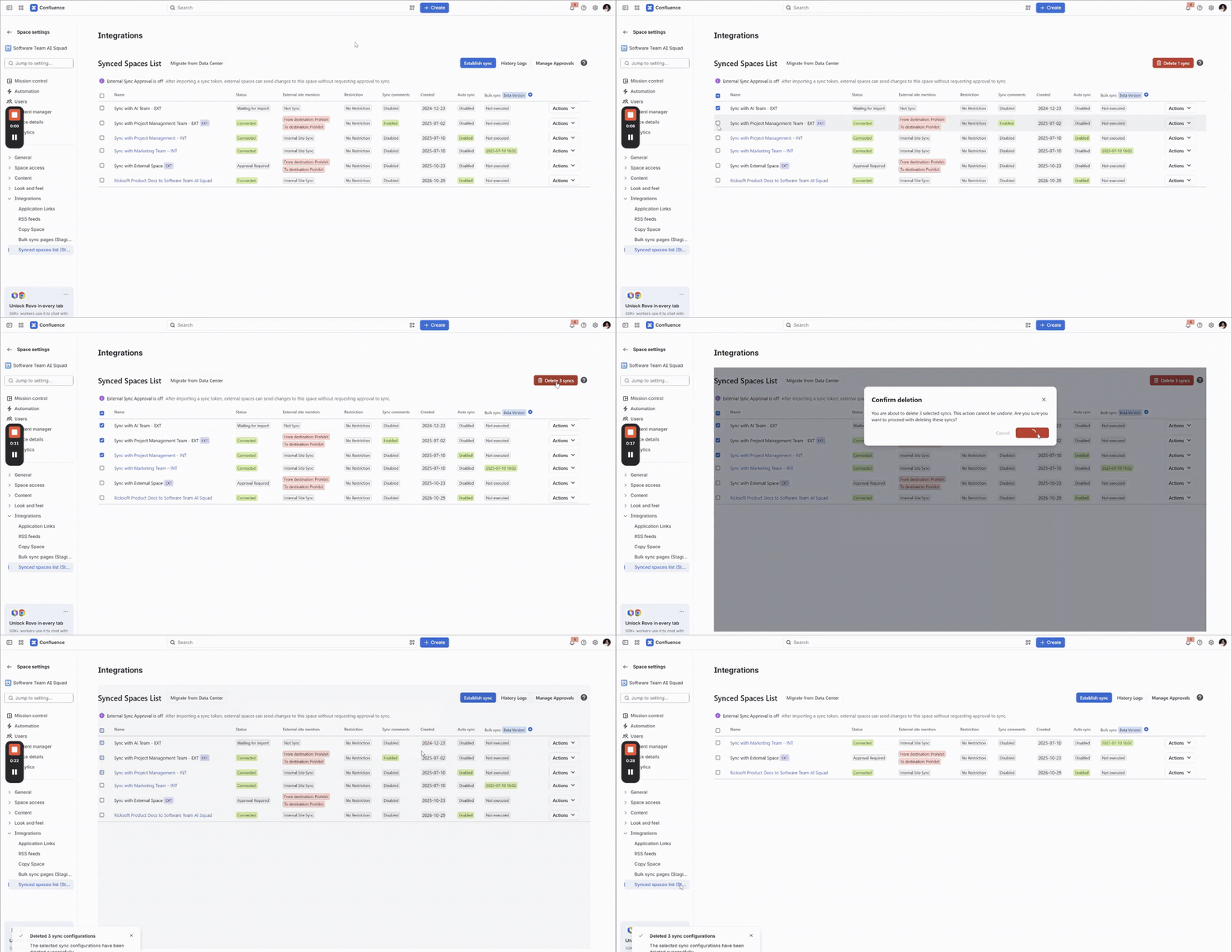
Open Space settings → Integrations → Synced spaces list.
-
Under Created syncs, select the checkboxes next to the sync configurations you want to delete.
-
Click Delete syncs. The button automatically displays the number of selected configurations, so you can review how many will be deleted.
-
In the Confirm deletion dialog, review your selection.
-
Click Delete syncs to confirm, or Cancel to keep the configurations.
Deletion results
Once the deletion is complete, a notification displays the result:
-
Successful: The selected configurations were deleted successfully.
-
Partially successful: Some configurations were deleted, while others could not be removed.
-
Failed: The selected configurations could not be deleted.
The notification shows the number of successful and failed deletions, when applicable.
Important: Deleting a sync configuration cannot be undone. Make sure you have selected the correct configurations before confirming.
Related documentation
For individual connection management and status information, see Manage Space Sync Connections.