
Access to system settings
Select System from the setting screen for system administrators.
Click to expand...
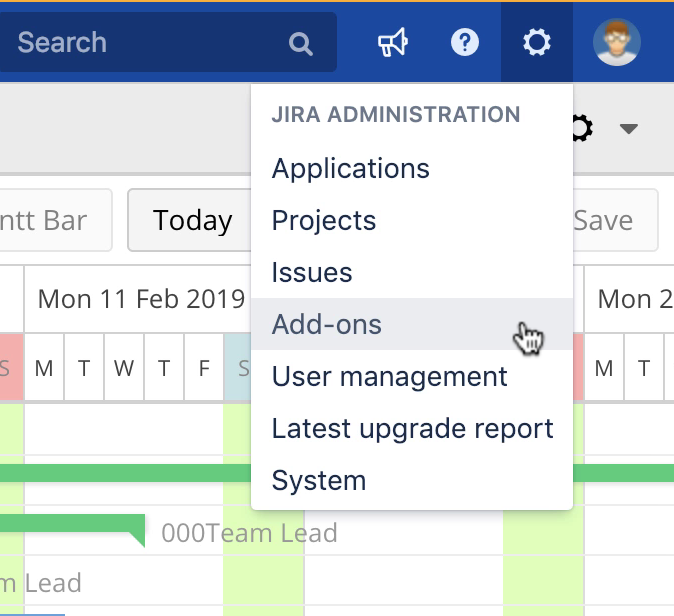
Various different settings, which we call global settings, can be viewed on the WBS Gantt-Chart administration screen. To access the administration screen follow these steps:
-
Select Add-ons from the Jira ADMINISTRATION menu.
-
Select the settings you would like to view from the WBS Gantt-Chart section on the side menu.
To view settings, one of the following permissions is needed:
-
Jira System Administrators
-
Jira Administrator
How to change the maximum number of displayable issues
If the number of issues displayed is too large, WBS Gantt-Chart may not function properly. You should set a number for the maximum number of issues to be displayed.
Update the maximum number of displayable issues in the field and click Save. Enter '0' for an unlimited number.
How to enable links to add-on apps
How to link to Excel-like Issue Editor for Jira
Enable the link to Excel-like Issue Editor for Jira so that it is ON and click Save.
When this is turned ON, the system links to our sister app, Excel-like Issue Editor. A menu for opening Excel-like Issue Editor for Jira is added to the WBS Gantt-Chart screen.
If you have any questions please feel free to ask a member of the Atlassian community!
Add the tag "addon-jp.ricksoft.plugins.wbsgantt-for-jira" when you ask a question.