
Overview
Starting from version 3.0.0, we're migrating all of our features from Atlassian Connect to Forge. This page outlines what changes, what stays the same, and what you may need to do. Forge offers better security and reliability, and your existing data is preserved.
This is a platform change, not a feature rewrite. Your sync configurations, site connections, whitelisting rules, sync logs and scheduled syncs are all retained, and the app keeps the same app key so the update is applied in place.
Important for Site Administrators
The Forge version declares a new set of granular permission scopes. Please refer to our documentation for instructions on updating your app.
We highly recommend completing this update as soon as it becomes available. We plan to deprecate the Connect version by the end of 2026, in line with Atlassian's plans for the Connect platform. Moving to Forge will ensure continued access to future updates, improvements, and support.
Why we are moving to Forge
-
-
Stronger security: Forge allows the app to request only the specific permissions it needs, instead of broad access to read, edit, or delete content. It also runs within Atlassian’s infrastructure, with additional controls over external data access.
-
More reliable auto-sync: Auto-sync now uses Forge product events rather than Connect webhooks. This provides more consistent handling of page creation, updates, deletion, restoration, and archiving.
-
Access to newer Confluence features: Forge gives the app access to newer Atlassian-supported capabilities, including page banners, content actions, the native Get Started experience, folders, and more granular content properties.
-
Better long-term compatibility: Atlassian is gradually retiring older Connect technologies and introducing stricter security and performance requirements. Moving to Forge helps ensure the app remains compatible with supported APIs and reduces the risk of disruption as legacy Connect features are phased out.
-
What’s changing in version 3.0.0
As we migrate all features to Atlassian's latest infrastructure, the app benefits from enhanced security. You may notice some navigation and design changes; here are the key updates we'd like to highlight.
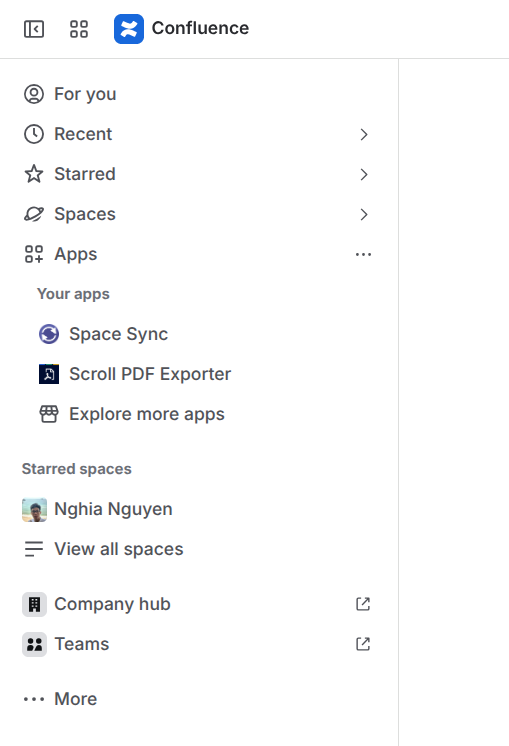
Where you open Space Sync
Space-level screens
|
|
Connect (2.1.8 and earlier) |
Forge (3.0.0) |
|---|---|---|
|
Entry point |
Space Sync item in the Confluence top navigation bar |
Apps menu → Space Sync |
The main Space Sync screen — space list, connections, sync configurations and logs — is unchanged. Only its location in the Confluence navigation moves, because Forge apps are registered under the Apps menu rather than in the header bar.
.png?cb=c8399fb9220e73a5172600bb68135582)
|
|
Connect (2.1.8 and earlier) |
Forge (3.0.0) |
|---|---|---|
|
Synced spaces list |
Space settings → Apps → Synced spaces list |
Space settings → Integrations → Synced spaces list |
|
Bulk sync pages |
Space settings → Apps → Bulk sync pages |
Space settings → Integrations → Bulk sync pages |
Both screens remain in space settings, and Synced spaces list is now listed above Bulk sync pages. Synced spaces list still requires the Administer space permission.
What stays the same
-
Your data is preserved: All existing sync configurations, site connections, whitelisting rules and requests, sync logs, and scheduled syncs will remain available. You will not need to recreate anything.
-
No reinstallation is needed: The app keeps the same app key, so the Forge update is applied directly to your existing installation. You do not need to uninstall the Connect version or install a separate app.
-
Your license remains valid: your current subscription and license status will carry over automatically. No additional purchase is required.
-
Your existing features will continue to work: The following capabilities remain available:
-
Page synchronization, including attachments, comments, inline comments, and labels
-
Bulk sync
-
Scheduled sync
-
Cross-site mentions
-
Whitelisting requests and approval workflows
-
Confluence Data Center support
-
-
Cross-site and hybrid connections are retained: Existing Cloud-to-Cloud and Cloud-to-Data Center connections will continue to work using their current tokens and OAuth configuration.
User experience overview
-
Navigation: The main app entry point moves to the Apps menu; space-level screens stay in space settings; the mention helper moves to the page ••• menu.
-
Permissions: Space-level screens still respect Confluence space permissions, and the Data Center settings screen is restricted to site administrators. Sync operations continue to run with the permissions of the acting user.
-
Performance: The synchronization engine is unchanged, so sync throughput and latency are comparable to 2.1.8. App screens are served through Forge Custom UI, so the very first load after the update may take slightly longer while assets are cached.
-
Look and feel: Screens follow Atlassian Design System tokens and now follow your Confluence theme, including dark mode.
Support and contact
Have questions, identified an edge case, or found a workflow affected by these changes? We'd love to hear from you. Please contact our support team by submitting a support request. Including details such as screenshots, page URLs, and steps to reproduce the issue will help us investigate and respond more quickly.